
Roamified Help Centre
Your Roamified questions, answered
Find the right data plan before you fly, keep your usual number while you’re away, and get help with calls, texts and Roamified Credits wherever your trip takes you.


Mobile data active
Japan · supported network
FAQ
Answers to questions
about Roamified
Getting started
Roamified is a travel connectivity app. You can use one reusable eSIM for mobile data overseas, call mobiles and landlines, send texts and manage additional phone numbers. Your plans, Credits and usage sit together in the app.
The eSIM connects your phone to mobile data while you travel. A Roamified Number is a separate subscription that gives people a number they can call or text. If you only need internet for maps, bookings and messaging apps, the eSIM is the part you need.
You’ll need an eSIM-compatible phone for Roamified mobile data. On a phone that supports the app, you can still use eligible calling and texting features over Wi-Fi or another mobile data connection.
You pay for a plan up front instead of per megabyte, so there are no surprise bills. Plans start from $4.50, and your data pauses at the limit instead of charging extra.
Your eSIM connects to local networks as soon as you land. You can track your usage live in the app and get alerts at 50%, 80% and 100%.
Yes. You can call mobiles and landlines in 200+ countries from the app using your Roamified Credits.
Yes. Your home SIM stays in your phone, so you can still receive calls and texts on your usual number while Roamified handles your data.
You’ll need an eSIM-compatible, unlocked phone to install a plan. Check your phone’s settings or the manufacturer’s list before you buy.
You get local, regional and worldwide plans, live usage tracking and a built-in wallet and calling app. You also never face overage charges, and your data speed is reduced once you’ve used 80% of your plan’s data allowance.
Carrier roaming and airport SIMs usually cost more and can lock you into fixed bundles. Roamified lets you choose only what you need, with clear prices before you pay.
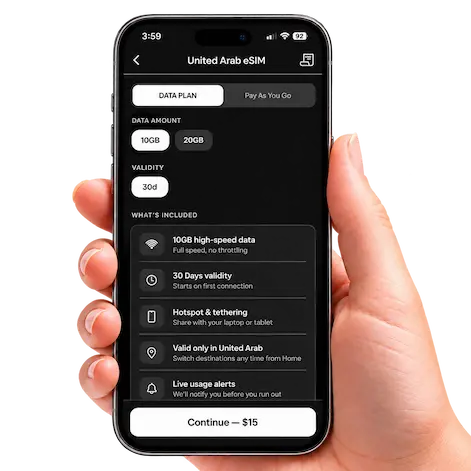
You can use your Roamified eSIM for mobile data in the UAE. Before you arrive, install it in a country where installation is supported, as you can’t install it while you’re in the UAE.
Destinations & data plans
Roamified offers travel data in 190+ destinations. Look up the country you’re visiting, then check the available plans and pay-as-you-go rate in the app. If you’re crossing a border, check your next stop too. Explore destinations
A prepaid plan gives you a set amount of data for a set period. It suits a trip where you know your dates and roughly how much data you’ll use. Pay as you go uses Roamified Credits at the local destination rate, which can suit a short stopover or a changing itinerary.
Yes. Keep the same Roamified eSIM installed as you move between supported destinations. If you buy a regional plan, check that it includes every country on your route. A single-country plan covers the destination listed for that plan.
Check your phone’s recent mobile data usage as a starting point. If you mostly use maps, email and messaging, your needs will be different from someone making video calls or streaming on the train. Downloading maps and entertainment over Wi-Fi before you leave can stretch your allowance.
Check the activation details and validity period for the plan you select before paying. This matters if you’re buying early or spending a few days in another country before you reach the destination covered by your plan.
Open the app to check your remaining allowance and expiry. You can choose another available plan for your destination or use pay-as-you-go data where supported. Check the destination rate and your Credit balance before continuing.
5G availability depends on your phone, the local partner network and coverage where you’re standing. A destination may support 5G in a city while offering a different connection in regional areas.
eSIM installation & activation
Check the specifications for your exact phone model and the region where you bought it. Look for an Add eSIM option in your mobile network settings and confirm with your carrier that your phone is unlocked. If you want to keep your home line active too, check that your phone supports two active lines.
Connect to reliable Wi-Fi, open the Roamified app and follow the eSIM installation prompts. Give the new line a recognisable name, such as Roamified Travel, so you can select the right one when you land. Check your chosen plan’s activation details before departure.
Turn on the Roamified line and select it for mobile data. Follow the roaming setting shown in your Roamified setup instructions. If you’re keeping your home SIM active, turn off data roaming for the home line and disable automatic mobile data switching if your phone offers it.
Keep it installed for your next trip. Switch mobile data back to your home SIM and turn off the Roamified line until you need it again. If you’ve already deleted the profile or you’re moving to a new phone, contact Support before trying to reinstall it.
Keeping your home number
Yes. On a compatible dual-SIM phone, your home SIM can stay active for calls and texts while Roamified handles mobile data. Your usual number stays with your existing provider. See how to keep your number
Calls and texts sent to your home number still go to your home line. Calls and eligible texts sent to a subscribed Roamified Number arrive in the Roamified app. Give people the number where you’d like them to reach you.
Yes. Choosing Roamified for mobile data leaves calls, texts and other activity on your home line subject to your provider’s roaming rates. Before you fly, check what triggers a daily roaming pass, especially if you plan to answer calls on your usual number.
Roamified Numbers
A Roamified Number gives you a dedicated phone number for calls and eligible SMS inside the app. For example, you can give it to hotels and tour operators while keeping your personal number for family and friends. Explore Roamified Numbers
Open Numbers in the app, browse the available countries, choose an available number and select a monthly or yearly subscription. You can add more than one number to the same account and choose which one to use for outgoing calls.
The subscription keeps your chosen number active. Receiving eligible calls and SMS on that number carries no extra Roamified charge. Outgoing calls to ordinary phone numbers and outgoing SMS use Roamified Credits. You’ll need an internet connection to use the app.
Yes. Open the number’s subscription settings in the app and check the renewal details before cancelling. If you still give that number to customers or use it for an account, check when access will end before you cancel.
Delivery depends on the sender and the type of number it accepts. Some banks and online services restrict verification messages to virtual numbers. Before travelling, check with the service you rely on and keep another sign-in method available.
International calls
Yes. Use the Roamified dialler to call supported mobiles and landlines in 200+ countries. The person you’re ringing can answer on their usual phone. You’ll need an internet connection and enough Credits for the call. Explore Global Calling
Check the per-minute rate for the number you’re calling in the app before you dial. Roamified deducts the charge from your Credits. Afterwards, your call history shows the duration and Credits spent.
You can use a subscribed Roamified Number or verify your personal number to use it as outgoing caller ID. The app also offers anonymous outgoing calling. If you want someone to ring you back in Roamified, call from your Roamified Number.
Yes. The dialler works over an internet connection, including Wi-Fi. Calling a regular mobile or landline still uses Roamified Credits, even when Wi-Fi provides the connection.
Use your phone’s native emergency calling function and the local emergency number. Keep a way to reach emergency services independently of the Roamified app.
SMS & free in-app conversations
Open messaging in the app, choose your sending number, enter the recipient’s mobile number with its country code and check the price before sending. Outgoing SMS to supported destinations uses Roamified Credits. The recipient can receive it as an ordinary text. Explore Worldwide Texting
If you want replies in the app, send from an SMS-enabled Roamified Number. You can also use a verified personal number for outgoing texts, but replies to that number go to your usual mobile service.
With an eligible Roamified Number subscription, you can call or message another Roamified user through the app without spending calling or SMS Credits. Both people need internet access, so any mobile data you use still counts towards your data allowance. Explore free in-app chats and calls
No. A message sent through WhatsApp or another internet messaging app uses Wi-Fi or mobile data. SMS Credits apply when you send a standard text through Roamified to a supported mobile number.
Smart Wallet, Credits & payments
Credits are the prepaid balance in your Smart Wallet. Use them for eligible pay-as-you-go data, outgoing international calls and outgoing SMS. Standard wallet Credits have no expiry date, so you can keep your balance for a future trip. Explore Smart Wallet
Open your wallet in the app, choose a top-up amount and review the currency and total before confirming payment. Once the top-up appears in your balance, the Credits are available for eligible services.
Yes. You can enable Auto Top-Up in the app or top up manually. Review the recharge amount and balance threshold before switching it on. Low-balance alerts can also help you decide when to add Credits.
Your data plan covers mobile internet in the destinations and period listed. If you use the Roamified dialler to ring a hotel landline or send an ordinary SMS, those charges come from your wallet. Check both your remaining data and Credit balance if you plan to use both services.
Enter your promo code before paying and check that the discount appears in the final total. For a refund, duplicate charge or missing top-up, choose Payments, billing or refunds on the Support page and include your transaction reference. Contact Roamified Support
Usage Dashboard & rewards
Open the Usage Dashboard to see the data available at your current destination. It brings together your active plan allowance, eligible rewards and pay-as-you-go availability. You can also check destination rates before using Credits. Explore the Usage Dashboard
Yes. The dashboard shows data usage by trip and monthly trends. Open your call history for the duration and Credits spent on a call, or your SMS history for the cost of a sent text. This is a good place to start if a charge looks unfamiliar.
Check the rewards area in your dashboard for benefits available to your account. If you received a referral or promotional offer, use its specific instructions to check eligibility, redemption steps and any expiry date.
Troubleshooting, account & privacy
Turn off Wi-Fi briefly so you can test the mobile connection. Check that Roamified is switched on and selected for mobile data, then confirm your destination is covered and you have an active allowance or enough Credits. Follow the plan’s roaming instructions and try toggling flight mode. Leave the eSIM installed while troubleshooting.
Check the recipient’s country code, the destination rate and your Credit balance. For an incoming call or text, make sure the sender is using your active Roamified Number. If a call connects but the other person can’t hear you, check the app’s microphone permission.
Use the Support form for sign-in issues, account changes or privacy enquiries. For a technical issue, include your phone model, the country you’re in, the error message and what you’ve already tried. For website cookies, you can manage or clear them through your browser settings. Visit the Help Centre
Roamified for Business & partnerships
Yes. Roamified for Business helps teams plan connectivity for short work trips, frequent travel and overseas assignments. Include your team size, travel frequency, usual destinations and any reporting or billing requirements when you enquire. Explore Roamified for Business
Travel businesses, hotels, airlines, digital platforms and event organisers can enquire about a partnership. Tell the team who needs connectivity, where they’ll be travelling and how you’d like to include Roamified in their experience. Explore partnerships
Yes. Travel publishers, bloggers, deal communities and digital creators can submit a partnership enquiry. Include your channel, audience and campaign idea. The partnerships team can discuss suitable offers and any performance-based arrangements with you. Enquire about a partnership
Still need a hand?
Tell us where you’re travelling, which phone you’re using and what’s happening. If your question is about a purchase, include your order reference so we can look into it.

Mobile Data

Numbers

Calls

SMS


